Products / Assets & Safety / LumioSafe
LumioSafe
Assets & Safety

LumioSafe

One short downlink, and LumioSafe speaks, glows and sounds. It tells people what happened — “Attention! Vehicle seventeen. Compressor stopped.” — not just that something did.

Technical guide How to Choose a LoRaWAN Sensor
LoRaWAN® Class C Voice, light & siren Battery powered
Product Type LoRaWAN® Voice & Light Alert Beacon
Depends on uplink interval and announcements Battery life
LoRaWAN® 1.0.3 · OTAA · Class C after join · ADR Protocol

Specifications

Light
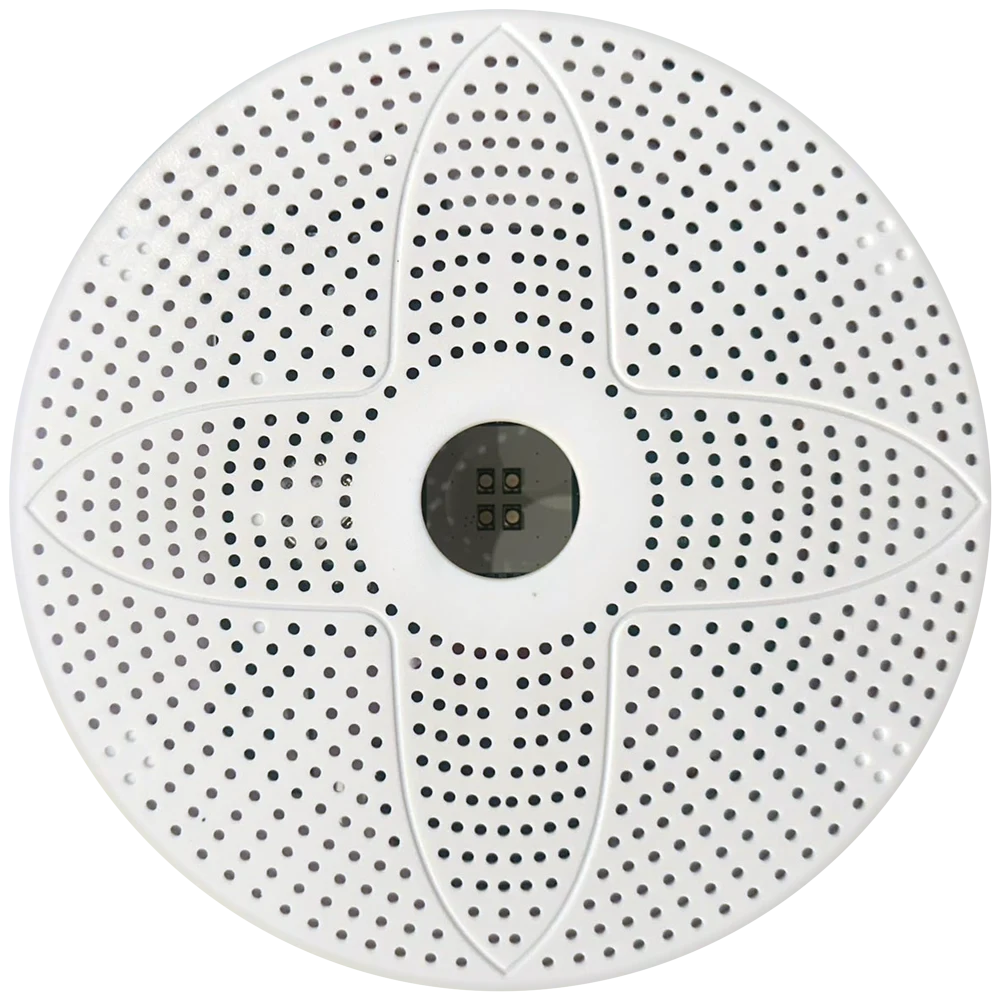
4× RGB LED behind the grille · 7 colours · 7 effects
Power
2 battery slots, Li-SOCl₂ 3.6 V (e.g. ER34615, D-cell)
Voice
49 fragments (Turkish set), numbers 0–9999, decoded on device
Signals
11 melodies, sweeping siren, custom beep 50 Hz–10 kHz
Protocol
LoRaWAN® 1.0.3 · OTAA · Class C after join · ADR
Enclosure
White plastic, perforated four-petal grille · snap-fit plate for ceiling or wall
Supervision
External hardware watchdog · heartbeat · status uplink
Battery life
Depends on uplink interval and announcements
Configuration
Downlink commands on FPort 2: light, melody, speech, volume, indicators, calibration
Region support
EU868 (863–870 MHz); other regions on request
Network servers
Any LoRaWAN 1.0.3 network server (The Things Stack, ChirpStack)
Wireless module
RAK3172-T · STM32WLE5CC, 32 MHz TCXO
Battery monitoring
Switched, calibrated voltage measurement · % in every uplink
Battery protection
Fuse per slot · ideal-diode OR-ing · 3.3 V buck-boost
Announcement latency
Typically 2–4 s from downlink to speech
Amplifier and speaker
Class-D mono · 8 Ω · 4 volume levels for tones and speech
Key features

  • Class C — always listening, alerts in seconds
  • 49 natural voice phrases, numbers 0–9999
  • 7 colours × 7 effects, whole-grille glow
  • 11 tones plus siren: chimes, bells, evacuation, alarm
  • 2 fused Li-SOCl₂ battery slots with ideal-diode OR-ing
  • Self-supervised: hardware watchdog and status uplinks

Reported Parameters

  • Battery voltage and level
  • Temperature
  • Network and device state
Custom Blocks

Product-specific content blocks

Overview

A siren says something is wrong. LumioSafe says what.

LumioSafe is a LoRaWAN® Class C alert beacon for places where a message has to reach people directly. It combines a natural human voice, a bright RGB light and an audible signal in one compact, battery-powered housing that mounts on a ceiling or wall in minutes.

The voice lives on the device. Your application sends only a few bytes — which alarm, which vehicle or zone, which colour — and LumioSafe composes and speaks the full sentence. Because it stays in Class C, the announcement starts within seconds of the downlink, with no audio streaming, no cabling and no app to install.

Built to run unattended, it reports its battery, temperature and state in every uplink, announces its own start-up, network join and low battery, and is supervised by an independent hardware watchdog.

Voice

Says exactly what happened.

49 natural voice fragments are stored on the device: system messages, alarm types and the building blocks of every number from 0 to 9999. Your server picks the pieces; LumioSafe reads them out as one sentence.

  • Vehicle, zone or room numbers spoken naturally
  • Pauses and chimes can be placed inside a sentence
  • Your own messages and languages, recorded in the same voice

Light

The whole grille lights up.

Four RGB LEDs in the centre window light up the whole housing: the window glows brightest and the colour shines through every hole across the face — visible from across a hall, not just from directly below.

  • Solid, slow and fast blink, strobe, heartbeat, two-colour and rainbow
  • Timed or permanent; returns to its standing colour after an announcement
  • One colour per alarm class, set over the air

Integration

One downlink. A complete announcement.

Light, chime and sentence travel together in a single short message. A webhook or rule on your network server builds it from any sensor event — Willow Software devices or third-party LoRaWAN sensors. Example: 11 bytes on FPort 2 (08 01 03 F2 04 10 F0 00 11 11 23) give a red strobe, a notification chime and “Attention! Vehicle seventeen. Compressor stopped.”

  • Typically 2–4 seconds from downlink to speech
  • Documented byte protocol and payload formatter included
  • Battery, temperature and state decoded from every uplink

Reliability

Built to work when nobody is watching.

An alert device is only useful if it is ready. LumioSafe checks itself, reports itself and recovers by itself.

  • Independent hardware watchdog resets the device if firmware ever stalls
  • Calibrated battery reading in every uplink; spoken low-battery warning
  • Two fused battery slots combined through ideal diodes
  • Heartbeat blink and an acknowledge flash for every downlink

Installation

Mounts in minutes. No cables.

Fix the plate, snap the beacon on, and it joins the network by itself — announcing “Connected, system ready” when it is done.

  • Snap-fit plate for ceiling or wall
  • Battery powered: no mains, no audio wiring
  • OTAA join with spoken status during commissioning

Applications

Depots, warehouses & plants
Schools & campuses
Offices & public buildings
FAQ

Frequently asked questions

Can't find your answer? Our engineers reply within one business day.

Ask a question
How fast does an announcement start?

Typically 2–4 seconds after your server sends the downlink. Most of that is radio airtime; a faster RX2 data rate (e.g. SF9) brings it under two seconds.

Which network servers does it work with?

Any LoRaWAN 1.0.3 network server, including The Things Stack and ChirpStack. We supply payload formatters for uplink decoding.

Can it say our own messages?

Yes. The phrase set is defined per project; we produce your messages in the same voice and build them into the firmware.

How long do the batteries last?

Class C keeps the receiver on so alerts arrive instantly, which dominates power use. Battery life depends on your uplink interval and the number of daily announcements — contact us for an estimate for your site.

Need this in a project?

Ask for product fit, integration path and deployment scope.